| William
Sutherland Architect |
 |
 |
 |
 |
 |
 |
 |
 |
Office
Address Cluan
Rydal Road
Ambleside
LA22 9BA
015394 34489
For
location plan
see Local Links

 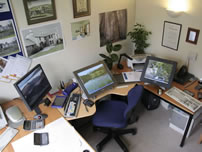 |
 Computers in the office "Which is the 'ANY' key ?"... as in... 'press any key to proceed' November 2008 update |
When I was an undergraduate in 1970s Edinburgh a computer 'expert' was someone who could put his pile of punched cards in the right order! See Computer Links Page.
A few general suggestions
- Hardware:
I will just get up on my soap-box
for a minute. We are not talking large business users here - just the
small practice or one-man office. You would perhaps assume that larger
offices have a system administrator who sorts out all the problems with
hardware - well... er... very few practices in the UK have a qualified
engineer organising and maintaining their hardware. This is probably
true of many business users in the UK in fact. OK even professional
system administrators do not know everything about hardware but they
do (or should) know the right way to set up and keep track of business
hardware so that when (not if) it falls over they will have a good idea
of why and can organise a fix promptly. I once came across a large-ish
office that had all their PCs daisy-chained in a sort of extended peer-to-peer
network - and the practice manager was wondering why they were having
so many problems with printing, data transfer and stability. Anyway...
- For
'regular' office PCs, if you can find a really good local machine builder who
also does proper maintenance try him/her. If not...
well, there is not much to choose between the direct (i.e. mail order) suppliers although Dell pretty much own this market.
For laptops I used to prefer IBM - not sure how the sell-off to Lenovo of China is going to affect quality long-term. (I currently use a Sony Vaio).
For well built, powerful machines I like Armari in London and the specialist firm CAD2.
These are often referred to as 'Workstation' machines. In truth the gap has closed between workstation machines and typical PCs but you do get a more business-like attitude to build quality - or perhaps component choice and a better case. Quite often these machines have more than one processor and with the advent of 'dual-core' processors - one chip containing effectively 2 processors - for both PC and Mac multi-processor machines are going to become more common (although most cad software does not directly use the extra processors). FWIW I have always used dual processors in my machines as it helps with rendering times in 3D modelling, and allows you to run more programmes at the same time. In recent times I have started using multi core processors. Dual quad core processors is a favourite for machines which do a lot of rendering but regular cad software mostly only uses one core. Using a 64 bit Operating system gives benefits if the cad software is also 64 bit.
Many architects like using Apple Macs - and will often make their cad software choice based on what runs on a Mac rather than the other way round. How the switch to Intel processors is going to impact on this market is not clear.
Most architects seem to stick to high specification 'normal' PCs these days but for those using Macs there is a decent range of 2D and 3D software available. I have read that OpenGL driver support for Mac machines is not as advanced as for PCs because of the size of the market and the programming teams, but I would expect the situation to improve with time. (OpenGL drivers accelerate the display of 3D objects in cad and modelling applications).
The advent of high powered graphics cards at relatively low prices has revolutionised the CAD workstation market - although you very much still get what you pay for (if you want good graphics card advice in UK or Europe try 3DProGraphics).
It was not always so, but recently the top-end 'games' cards from Nvidia and Ati are so powerful that there are only some special features lacking from them compared to their workstation equivalents, that are almost certainly not needed by many cad and 3D modelling packages. The differential in price is staggering.
I have always bought workstation cards rather than games cards but games cards are so cheap for the power many people try those first (new graphics cards are generally now PCexpress slot rather than the older AGP type slot which means you need a complete new machine).
- Software:
Apart from the operating system which is usually some flavour of MS
Windows™ these days for PCs (I readily admit I know nothing about Apple Macs... other than that OS X is the latest OS for Macs)
The best bit of software, apart from cad, I have bought for the office has to be ArchiOffice it has transformed record keeping, letter writing, time recording, invoice issuing... and increased profitability.
Security
I do not really feel qualified to comment on Internet Security but
if you want to worry just have a read through some of the wonderful information
and utilities available on Gibson
Research Corporation's famous website.....
Home
¦ Park
Issues ¦ Services ¦ Local
Links ¦ Technical Section
Allplan
FT Users Page 1
| disclaimer - please read! |
Site © WSA 2015 Landscape Views © T Richards
|